
CloudFloor DNS Logo
CloudFloorDNS Icon

Netmon Explained: 19 Ways to Know Something Broke Before Your Customers Do

Netmon Explained: 19 Ways to Know Something Broke Before Your Customers Do

Most outages are not discovered by the people who run the service. They are discovered by a customer who could not log in, a caller who got dead air, or a browser that threw a certificate warning. Netmon is the part of CloudFloorDNS that is meant to get there first.

This post explains what Netmon is, walks through all 19 test types and what each one actually proves, and shows how a failed test can do more than send an email: it can move your DNS to a working server.

The short version: Netmon checks your services from up to seven locations around the world, as often as every 10 seconds. A fault is only confirmed when a majority of those locations agree. When it is confirmed, Netmon can alert you by email, SMS, webhook or syslog, and can trigger DNS Failover or pull a server out of a load-balanced pool.

What Netmon is

Netmon is an outside-in monitoring platform. It does not run an agent on your servers. Instead, it connects to your services over the internet the same way your users do, from monitoring locations in Atlanta, Chicago, Dallas, Los Angeles, London, Amsterdam and Frankfurt.

Each test records whether the service answered correctly and how long it took. You get an uptime figure, a response-time graph per test, and a log of every status change.
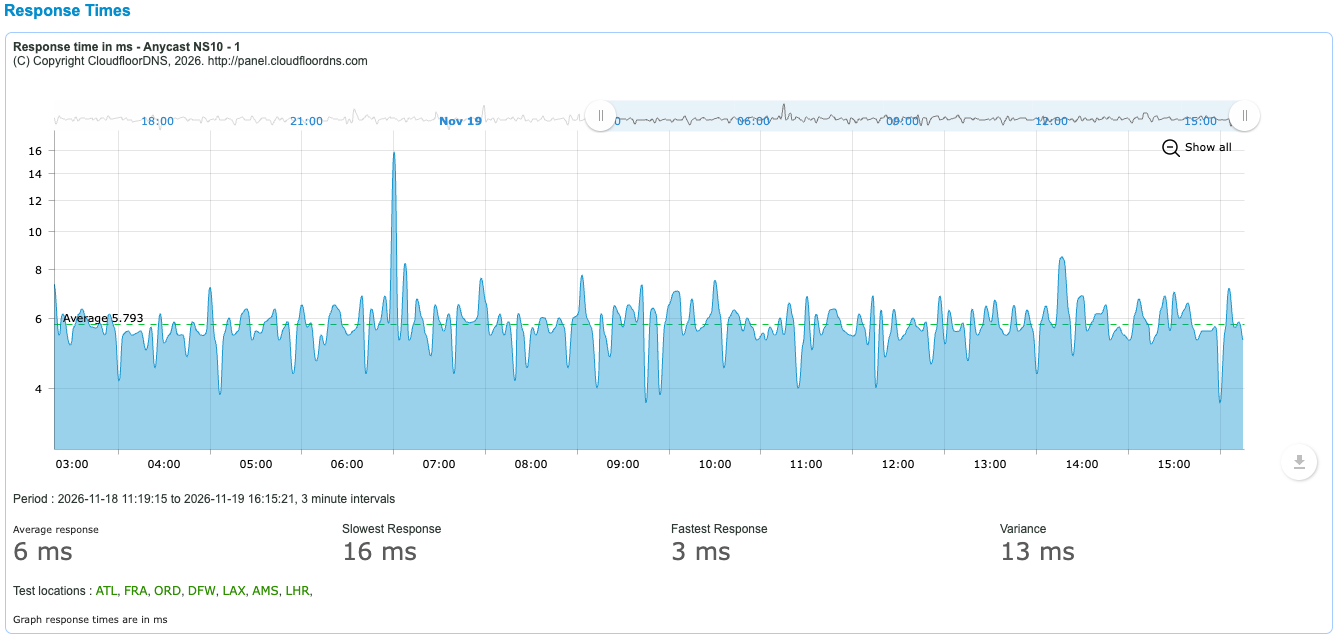
Netmon response time graph showing average, slowest and fastest response in milliseconds across seven test locations

Why several locations matter

A single monitoring point cannot tell the difference between “your server is down” and “the path between me and your server is having a bad minute”. If you alert on that, you get woken up for problems that are not yours. If you fail over on it, you move traffic for no reason.

Netmon only confirms a fault when a majority of the locations running the test report it. One location on its own never triggers an alert or a failover. If you want to hear about that first lone failure anyway, you can route it to a separate warning profile, and the message is clearly marked as a pre-emptive warning and not a confirmed fault.

The 19 test types

The tests are grouped below by what you are trying to protect. Every test lets you set the port and a response timeout, and every test records its response time.

Websites and certificates

Test What it proves
HTTP Your site or API answers over HTTP or HTTPS with the status code you expect. It can also check that the page contains a specific piece of text, or flag when the page content changes.
SSL Expiry Monitor Your certificate is not about to expire. It reads the certificate on any TLS port, reports the name, expiry date and days left, and sends reminders as the date approaches: you choose when they start, from 45 days out down to 1 day.

Email

Test What it proves
SMTP Your mail server accepts connections and greets them properly. A server that is up but refusing mail fails this test.
POP Your POP3 service is answering. Give it a username and password and it also proves that a mailbox can sign in.
IMAP Your IMAP service is answering, with the same optional sign-in check as POP.

DNS

Test What it proves
DNS A specific nameserver answers a specific question. You choose the record type (A, AAAA, MX, NS, TXT, CNAME, PTR, SRV or SOA) and can require a particular answer, so a server that responds with the wrong data fails too.
DNS over TCP The same query, forced over TCP. This catches the firewall that allows UDP port 53 but blocks TCP, which only shows up when a response is too large for UDP.
DNS Experience Your name resolves the way your users experience it: through a recursive resolver, not by asking your nameserver directly. It measures the lookup a real visitor depends on.

Voice and unified communications

Test What it proves
SIP UDP OPTIONS Your SIP server or SBC replies to an OPTIONS request over UDP, and how quickly. This is the standard SIP “are you there” check.
SIP TCP OPTIONS The same check over TCP, for trunks and endpoints that signal over TCP.
SIP TLS OPTIONS The same check over an encrypted TLS connection, so you know secure signalling is working and not only the unencrypted port.
Cisco Expressway Your Expressway edge answers the sign-in discovery request that Cisco Jabber and Webex clients make from outside your network. If this fails, remote users cannot register.

Remote access and file transfer

Test What it proves
SSH The SSH service accepts a connection and identifies itself. You can require a specific string in its banner.
FTP The FTP service accepts a connection and sends its greeting.
TELNET The Telnet service on a network device or legacy system accepts a connection.

Network and generic ports

Test What it proves
Ping The host is reachable, and the average round-trip time across four pings.
TCP Connect A TCP port is open and accepting connections. Use it for any service that does not have its own test.
Advanced TCP A configurable TCP check: any port, your own response timeout, a response-time warning, and a check that the service replies with a value you specify.
UDP Connect A UDP port can be reached. Use it for UDP services that do not have a dedicated test.

Choosing the right test

The most common monitoring mistake is testing something easier than the thing you care about. A few rules of thumb:

Test the protocol, not the port

An open port 443 does not mean your site works. An HTTP test with a content check does. Use the protocol test whenever one exists.

Ping answers a different question

Ping tells you the machine is on the network. Plenty of servers answer ping while the application on them is down.

Check the answer, not only the reply

A DNS server returning the wrong address is worse than one returning nothing. Set an expected answer where the test allows it.

Layer your tests

Ping plus HTTP plus SSL Expiry on the same site tells you which layer broke, which saves time when the alert arrives.

From alert to action: DNS Failover and Load Balancing

Knowing about a problem is useful. Having it handled while you are still reading the alert is better. Any Netmon test can drive our DNS services:

DNS Failover. When a test is confirmed down, Netmon changes your DNS record to point at a backup. When the primary recovers, it can fail back automatically, or stay put until you decide. With 10-second monitoring, failover can complete in as little as 30 seconds. You can also fail over and back manually from the control panel, which is handy for planned maintenance.

Failover Pools. If one backup is not enough, a pool gives a hostname an ordered list of targets (IP addresses, CNAMEs or ALIAS records), each with its own Netmon test.

DNS Load Balancing. When you spread traffic across several servers, Netmon removes a failed server from the rotation and puts it back when it recovers.

The SIP and Cisco Expressway tests pair with VOIP Failover in the same way.

Notifications

Alerts are controlled by alert profiles. A profile says who gets told, how, and when. Each test can have up to three: a warning profile, an alert profile and an escalation profile.

Method How it works
Email One or more recipients. A down alert includes the last response received and a diagnostic trace to the host. A recovery alert tells you how long the service was unreachable.
SMS Text messages to one or more numbers, with their own start and end times so texts only arrive when you want them.
Webhook Netmon calls a URL you supply with the new status, so you can open a ticket, post to a chat channel or kick off your own automation.
Syslog Test results are sent to your syslog server over UDP or TCP, ready for your SIEM or log platform.

A webhook is a simple request to your URL with a status of bad, good or warn. If you set a secret token on the profile, it is sent too, so your endpoint can check the call really came from Netmon:

https://hooks.example.com/netmon?status=bad&secret_token=YOUR_TOKEN

Three settings keep alerts useful instead of noisy:

  • Start and end times. Each profile has a window in which it is active, so the overnight profile can go to the on-call phone and the daytime one to the team inbox.
  • Alert threshold. The number of times the error condition must occur before an alert is sent. This filters out minor transient faults.
  • Escalation and acknowledgement. If a fault continues, Netmon can escalate to a second profile. Every alert email carries an acknowledge link: click it and the escalation stops.

You can also set a response-time warning in milliseconds on a test, to hear about a service that is slowing down before it stops.

Intervals, locations and plans

How often a test runs and how many locations it runs from depend on your plan. Netmon is available on its own, and it is included with DNS Failover.

Plan Monthly Monitors Interval Locations SMS / month Webhooks and syslog
Free $0 1 1 hour 1 None No
Starter $5 5 5 minutes 3 50 No
Pro $10 10 3 minutes 5 100 Yes
Business $35 25 1 minute 7 200 Yes
Enterprise $60 50 10 seconds 7 400 Yes

Email alerts are included on every plan. Larger or custom setups are quoted individually. Full details are on the monitoring plans and pricing page.

Things worth knowing that a sales page usually leaves out

  • The standalone Netmon plans are monitoring only. Automatic DNS changes need DNS Failover, which includes Netmon. DNS Failover starts at $50 a month including Anycast DNS.
  • A slow response warns you; it does not fail over. Response-time warnings are alerts only. Failover acts on a confirmed failure, not on a slow reply.
  • The SSL Expiry Monitor watches the date. It will tell you a certificate is running out. It is not a check that the certificate matches the hostname or chains to a trusted root, so keep an HTTP test on the same site.
  • UDP is a quiet protocol. A service that receives a UDP packet is not obliged to reply, so a generic UDP check can only tell you so much. For DNS and SIP, use their own tests, which ask a real question and wait for a real answer.
  • Use a dedicated mailbox for sign-in checks. The POP and IMAP login tests work best with a test account created for the purpose, not a real person’s mailbox.
  • Majority rule cuts both ways. A problem that only affects one region will reach you as a warning, not as a confirmed outage. That is the right call for failover, but it is worth setting up a warning profile so you still hear about it.
  • DNS caching still applies. Failover changes the answer at the source within seconds. Visitors move over as their resolver’s cached copy expires, which is why failover records use a short TTL.

Setting up your first test

1

Create an account

Sign up at panel.cloudfloordns.com. The free plan is enough to try one test.

2

Create an alert profile

Decide who is told and how: email addresses, SMS numbers, a webhook URL or a syslog server, with the hours it applies and the alert threshold.

3

Add a test

Pick the test type, enter the host and port, set what a good response looks like, then choose the interval and the locations to test from. Attach your alert profile.

4

Decide what happens on failure

Alerting alone is a fine place to start. When you are ready, link the test to DNS Failover or a load-balanced record so a confirmed fault moves traffic on its own.

Find out before your customers do

Start with one free monitor, or talk to us about pairing Netmon with DNS Failover.

Create a free account Email sales

Questions about a specific setup? Email support@cloudfloordns.com or sales@cloudfloordns.com, or call +1 781 373 5823.
Introducing DNS Failover Pools: Fail Over to a Tertiary IP, CNAME, or ALIAS

For years, DNS failover at CloudFloorDNS has worked the way it works almost everywhere: you have a primary IP and a backup IP, Netmon watches the primary, and when it goes down we swap the record. It is simple and it has saved a lot of people a lot of 3 a.m. phone calls.

It also has an obvious limit. Two states, good and failed, is one backup. If the backup is down too, or if your backup is not an IP address at all but a CDN hostname or a cloud load balancer, the old model had nowhere to go. Failover pools fix that, and around here we think the result is wicked awesome.

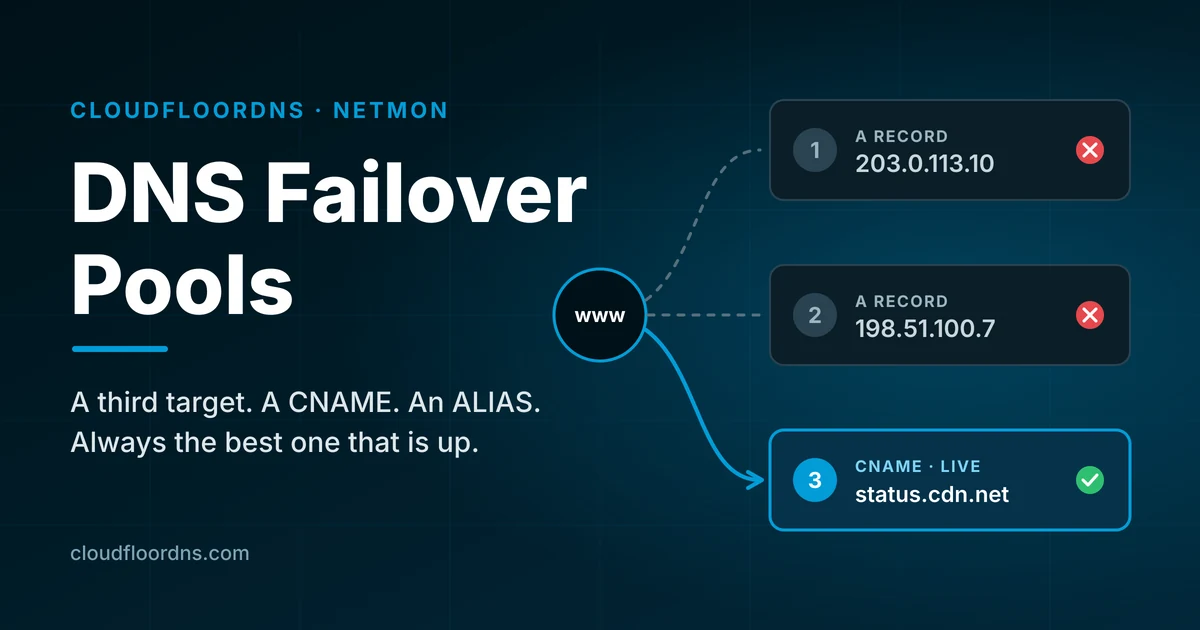
The short version: a failover pool is an ordered list of targets for one hostname. Each target can be an IPv4 address, an IPv6 address, or a hostname (CNAME or ALIAS), and each one gets its own health check. Netmon always publishes the best target that is actually up. True sequential failover.

What a pool looks like

A pool belongs to one name in your zone, such as www.example.com or the bare example.com. Inside it you list targets in priority order:

Priority Type Target What it is
1 A 203.0.113.10 Your main data center
2 A 198.51.100.7 Your second site
3 CNAME sorry.cdn.example.net A status page on a CDN (last resort)

If the main data center fails, visitors go to the second site. If that fails too, they land on a status page instead of a browser error. When things recover, traffic moves back up the list according to rules you choose. There is a maximum of 8 Targets per pool.

What is new

A third target, and beyond

Pools are ordered lists, not a primary and backup pair. Add as many fallbacks as your setup really has.

Hostnames as targets

Fail over to a CNAME or ALIAS target such as a CDN, a cloud load balancer, or a hosted status page, not just a fixed IP.

A health check per target

Every target is monitored on its own, so we never send traffic to a backup that is also down.

Ordered or active-active

Serve only the best healthy target, or serve every healthy IP at once and drop the ones that fail.

Fail-back on your terms

Return to the primary automatically, after it has stayed healthy for a set time, or only when you say so.

Manual control and a history

Force a target, pause the pool during maintenance, and see exactly which records were published and why.

How it decides what to publish

Netmon checks each target from multiple monitoring locations, and a target is only marked down when enough of those locations agree. One site having a bad route to your server does not move your DNS.

When a target changes state, the pool works out what the DNS answer should be and publishes it only if that differs from what is already live. In ordered mode that is the highest priority target that is up. In active-active mode it is every healthy A and AAAA target together.

Two settings keep a struggling server from bouncing your traffic back and forth:

  • Minimum hold time. After a change, the pool stays put for a short period (two minutes by default) as long as the target it moved to is healthy. If the live target dies, the pool moves away immediately. The hold never traps you on a dead server.
  • Fail-back policy. Automatic returns to a better target as soon as it recovers. Delayed waits until that target has stayed up for a period you set. Manual stays on the backup until you release it, which is the right choice when a recovered server needs a data sync or a look from a human first.

When everything is down

Most failover products get vague here. With a pool you choose in advance:

  • Last resort. Serve the target you marked as last resort whether or not it passes its check. This is the usual home for a status page or a holding page.
  • Last known good. Keep serving whatever was live most recently.
  • Serve all. Publish every IP in the pool and let clients try them.

Our existing redirect page and holding page options are available as last resort targets inside a pool, so you can put one at the bottom of the list behind your real servers.

One rule we will not break: a pool never publishes an empty answer. If a hostname target cannot be resolved, or nothing usable is left, the previous answer stays live. A stale answer beats no answer.

Hostname targets, including at the zone apex

DNS does not allow a CNAME at the top of a zone, and it does not allow a CNAME to sit beside other records on the same name space. That is the reason most failover services only accept IP addresses.

Pools handle it for you. On a subdomain where the hostname is the only target being served, we publish a real CNAME. Anywhere else, including the bare domain, we resolve the hostname and publish the resulting addresses, which is what an ALIAS record does. If you enter a CNAME target on the apex, the editor converts it to ALIAS and tells you.

Setting one up

1

Start from a Netmon test

Open the test that monitors your primary server and choose Multi-target failover pool as the failover method. Your current host is filled in as target 1.

2

Add your targets

For each one, pick the type and enter the IP or host name. By default we populate the Target from the Netmon test host which is configured. You can link any test you already have configured.

3

Choose the behavior

Set the mode, the fail-back policy, the all-down behavior, and the TTL. Pool TTLs run from 30 to 300 seconds, with 60 as the default.

4

Save

The pool reads the current state of every check and publishes the correct answer right away. There is no waiting for the next failure to find out whether it works.

Is your zone hosted somewhere else? You can still use a pool. We give you a pool hostname on our network, and you point a CNAME at it from your existing DNS provider.

Things worth knowing that a sales page usually leaves out

  • DNS failover is not instant. A change reaches visitors as their resolvers’ cached answers expire. With a 60 second TTL, most traffic moves within a minute or two of detection. A small number of resolvers and applications hold answers longer than they should, and no DNS provider can change that.
  • Flattened hostnames are resolved from our side. When a hostname target has to be published as addresses, we do the lookup. If that hostname belongs to a CDN that steers by location, your visitors get the addresses the CDN handed to us, not ones chosen for where they are. For a last resort status page this rarely matters. For a primary target that depends on geographic steering, use a subdomain so we can publish a real CNAME.
  • Active-active is for IP targets. It serves all healthy A and AAAA targets. Hostname targets come into play as the last resort.
  • A health check tests what you tell it to test. A server that answers on its port while showing an error page looks healthy to a basic check. Pick a check that reflects what your users actually need.
  • Your backups have to be real. A pool will send traffic to target 2 with confidence. Make sure target 2 can take the load and has current data.

Already using failover with us?

Nothing changes unless you want it to. Existing two-address failover keeps working exactly as it does today. Pools are an option on each test, and you can move one hostname over at a time.

Give your hostname more than one way out

Failover pools are available now in Netmon. Log in to set one up, or talk to us about how it fits your setup.

Open the control panel Email sales

Questions? support@cloudfloordns.com or +1 781 373 5823

What’s Your DNS Backup Plan?

Every service you run has a backup plan. Your database replicates. Your servers sit behind a load balancer. Your files get snapshotted nightly. Now answer this honestly: if your DNS provider went dark right now, what happens to all of it?

For most organizations the answer is “everything stops.” Not the website, not the API, not just email. Everything with a hostname in it. And unlike a server failure, there is no graceful degradation. Resolvers either get an answer or they don’t.

This post walks through the DNS backup plans we see in the wild, why most of them don’t hold up, and why we think Secondary DNS is the single best cost-to-benefit move you can make for your infrastructure this year. It also covers a few things worth knowing that a sales page usually leaves out.

Why a DNS outage is worse than a server outage

When a web server dies, your monitoring fires, users see an error page, and the blast radius is one service. When your authoritative DNS stops answering, the blast radius is your entire domain:

Web and API

No A/AAAA record, no connection. Your CDN and WAF don’t help if nobody can find them.

Email

MX lookups fail, so inbound mail queues at the sender. SPF, DKIM and DMARC lookups fail too, so outbound mail starts getting rejected or quarantined.

Everything else

VPN endpoints, SSO, SaaS verification records, internal tooling, mobile apps. Anything that resolves a name under your domain.

The part people underestimate is how long it lasts. DNS outages at managed providers are usually caused by DDoS attacks, control-plane failures, or a bad config push, and those can run for hours. Cached answers buy you some time, but once TTLs expire across the big public resolvers, you’re fully offline with no way to fix it from your side.

The backup plans people actually have

We talk to a lot of operators about this. Here’s what “our DNS backup plan” usually turns out to mean, and where each one breaks.

Plan A: “Our provider has lots of PoPs”

Anycast with many points of presence protects you against a single data center going down. It does not protect you against a provider-wide problem: an authentication outage, a bad software deploy, a control-plane bug that pushes an empty zone everywhere, or an attack large enough to saturate the whole network. All of those have happened to large, well-run DNS providers. Every PoP being down is still “down.”

Plan B: “We have long TTLs”

Long TTLs help for a while, but resolvers don’t honor them uniformly, many clamp to a few hours, and once the cache expires there’s nothing to fall back on. Long TTLs also make your actual failover slower when you do need to change a record. This is hoping, not planning.

Plan C: “We keep a zone file export somewhere”

Better than nothing, but restoring it means signing up with a new provider during an outage, importing the zone, updating NS records at the registrar, and then waiting for the delegation change to propagate. Realistically that’s half a day, assuming your registrar login isn’t tied to email on the domain that’s down.

Plan D: “We run two providers and keep them in sync by hand”

This works until it doesn’t. Two control panels, two APIs, two sets of credentials, and a record that got updated in one place but not the other. The drift is silent until the day you fail over to the stale copy.

Secondary DNS: the backup plan that actually works

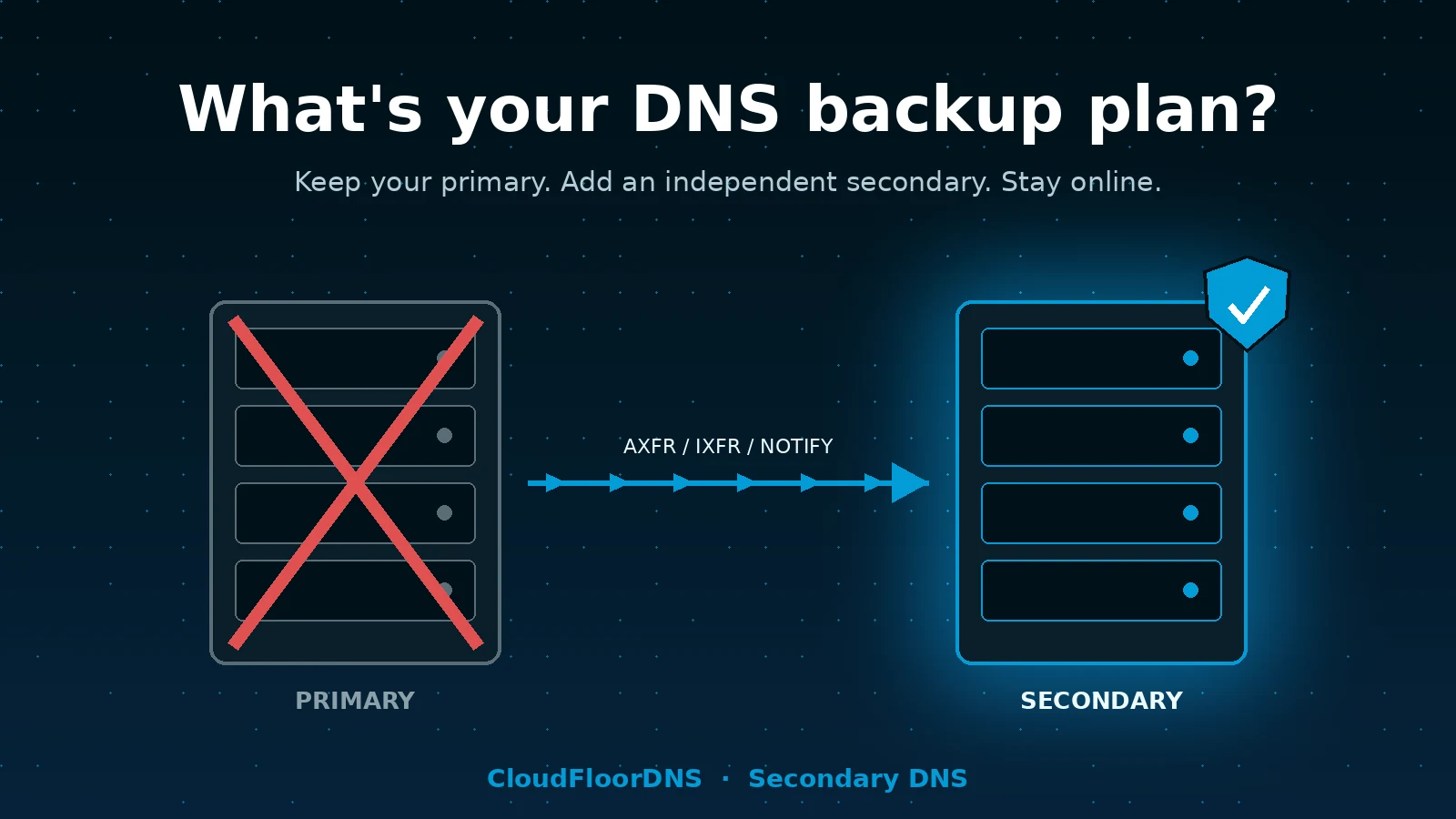
Secondary DNS is the mechanism DNS was built with for exactly this problem. You keep your existing provider as the primary and the only place you edit records. A second, independent provider pulls a copy of the zone automatically using standard zone transfers (AXFR/IXFR), gets told about changes instantly via NOTIFY, and serves the identical zone from its own nameservers.

Both sets of nameservers are listed in your delegation. Resolvers pick whichever one answers. If your primary disappears, resolvers simply keep getting answers from the secondary, and nobody notices. There is no failover event, no DNS change to push, no 3 a.m. decision to make.

Key point: secondary DNS isn’t a backup you restore from. It’s a live, always-on second copy that’s already answering queries. The “failover” is built into how resolvers work.

Why we think it’s the best bang for the buck in your stack

We sell a lot of things at CloudFloorDNS, and we’ll be the first to say Secondary DNS isn’t the most expensive one. It might be the one we’re proudest of, because the ratio of risk removed to money and effort spent is hard to beat.

What you get What it costs you
Full provider-level redundancy on a separate anycast network, separate code base, separate control plane A small monthly fee per zone, far less than a second full managed DNS subscription
Zero ongoing sync work; changes replicate automatically within seconds of a NOTIFY About an hour of setup, once
No change to how your team manages DNS day to day Nothing. You keep editing records exactly where you do today
Protection against the outage class that nothing else in your stack covers No new vendor lock-in; standard AXFR/IXFR means you can leave any time

A few things about our implementation specifically:

  • Our own DNS server software. CloudFloorDNS runs a purpose-built authoritative server, not BIND. If a vulnerability or bug hits the software your primary runs, it almost certainly doesn’t hit ours at the same time. Real diversity, not just a second IP range.
  • Global anycast. Your secondary isn’t a box in one data center. It’s served from our worldwide anycast network with DDoS mitigation, the same infrastructure our primary customers run on.
  • Standards all the way down. AXFR, IXFR, NOTIFY, TSIG-authenticated transfers, IPv4 and IPv6. If your primary can do a zone transfer, we can be its secondary. That includes BIND, PowerDNS, Knot, NSD, Windows DNS, and most managed providers that offer outbound transfers.
  • Twenty-five plus years of doing exactly this. We’ve been running authoritative DNS since before “managed DNS” was a product category.

Things worth knowing before you set it up

This is the part most vendor pages skip. None of these are deal-breakers, but you should walk in with your eyes open.

Your primary has to allow outbound zone transfers. Self-hosted servers almost always can. Managed providers vary. Some include it on every plan, some restrict it to higher tiers, and a few don’t offer it at all. Cloudflare, for example, only offers zone transfers on Enterprise plans. Check this first.

Proprietary record types don’t transfer. ALIAS/ANAME-at-apex, weighted pools, provider-specific failover and geo records are not standard DNS. AXFR carries what the primary chooses to export, which is usually the “flattened” result. Test what your secondary actually serves for those names before you rely on it.

DNSSEC needs a plan. If your zone is signed, the secondary either serves the pre-signed zone as transferred (RRSIGs included), or the two providers need to coordinate keys. Pre-signed transfer is the simplest and what we recommend.

Mind your SOA expire value. If the primary is unreachable for longer than the SOA expire timer, a conforming secondary stops answering. A lot of zones still carry the default of one week, which is fine. If yours is set to something short, raise it before you need it.

How to set it up

Here’s the whole process. For a single zone it’s well under an hour, most of which is waiting on the registrar.

1
Confirm your primary can transfer the zone. On a self-hosted server that’s an allow-transfer or equivalent. On a managed provider, look for “outbound zone transfer,” “AXFR,” or “secondary DNS” in the settings.
2
Create the zone as a secondary in the CloudFloorDNS panel. Enter your primary’s transfer IP (and TSIG key if you use one). We’ll show you our transfer source addresses to allow-list, and the nameserver hostnames to use for the zone.
3
Allow our servers on the primary and enable NOTIFY. Add our transfer addresses to the primary’s allow list and configure it to send NOTIFY messages to us so changes replicate immediately instead of on the SOA refresh timer.
4
Verify the transfer. Query our nameservers directly and compare the SOA serial and a few records against your primary.
5
Add our nameservers to the zone and the delegation. Add NS records for our nameservers in the zone itself (on the primary, so they transfer over), then add the same nameservers at your registrar. Do not remove your existing ones.
6
Test the failure case. Temporarily block queries to your primary’s nameservers from a test resolver and confirm your domain still resolves. If you’ve never done this, you don’t have a backup plan. You have a hope.

Verifying the transfer is one command:

dig +short SOA example.com @your-primary-ns
dig +short SOA example.com @our-secondary-ns
# serials should match

A quick self-assessment

If you answer “no” or “I’m not sure” to any of these, it’s worth fixing before the day it matters.

  • Do your domain’s NS records point at nameservers run by more than one organization?
  • If your DNS provider’s control panel were unreachable for six hours, would your domain keep resolving?
  • Have you actually tested that, rather than assumed it?
  • Does your registrar account use an email address that would still work if your domain’s DNS were down?
  • Do you know your zone’s SOA expire value?

The bottom line

You already pay for redundancy everywhere else in your stack. DNS is the one layer where a single-vendor failure takes down all of it at once, and it’s also the one layer where the fix is cheap, standards-based, and requires no change to how your team works. Secondary DNS from CloudFloorDNS gives you an independent, globally anycast copy of your zone that’s already answering queries before anything goes wrong.

Ready to have an actual DNS backup plan?

Set up Secondary DNS in the panel in minutes, or talk to us about multi-zone and enterprise deployments.

Get started with Secondary DNSEmail sales

Questions? support@cloudfloordns.com or +1 781 373 5823.

CloudFloorDNS is not affiliated with Cloudflare, Inc. or any other provider named in this article. Product names are the property of their respective owners and are referenced only to describe interoperability and publicly documented plan limits, which may change.