


Blog
Netmon Explained: 19 Ways to Know Something Broke Before Your Customers Do
November 19, 2026
Most outages are not discovered by the people who run the service. They are discovered by a customer who could not log in, a caller who got dead air, or a browser that threw a certificate warning. Netmon is the part of CloudFloorDNS that is meant to get there first.
This post explains what Netmon is, walks through all 19 test types and what each one actually proves, and shows how a failed test can do more than send an email: it can move your DNS to a working server.
The short version: Netmon checks your services from up to seven locations around the world, as often as every 10 seconds. A fault is only confirmed when a majority of those locations agree. When it is confirmed, Netmon can alert you by email, SMS, webhook or syslog, and can trigger DNS Failover or pull a server out of a load-balanced pool.
What Netmon is
Netmon is an outside-in monitoring platform. It does not run an agent on your servers. Instead, it connects to your services over the internet the same way your users do, from monitoring locations in Atlanta, Chicago, Dallas, Los Angeles, London, Amsterdam and Frankfurt.
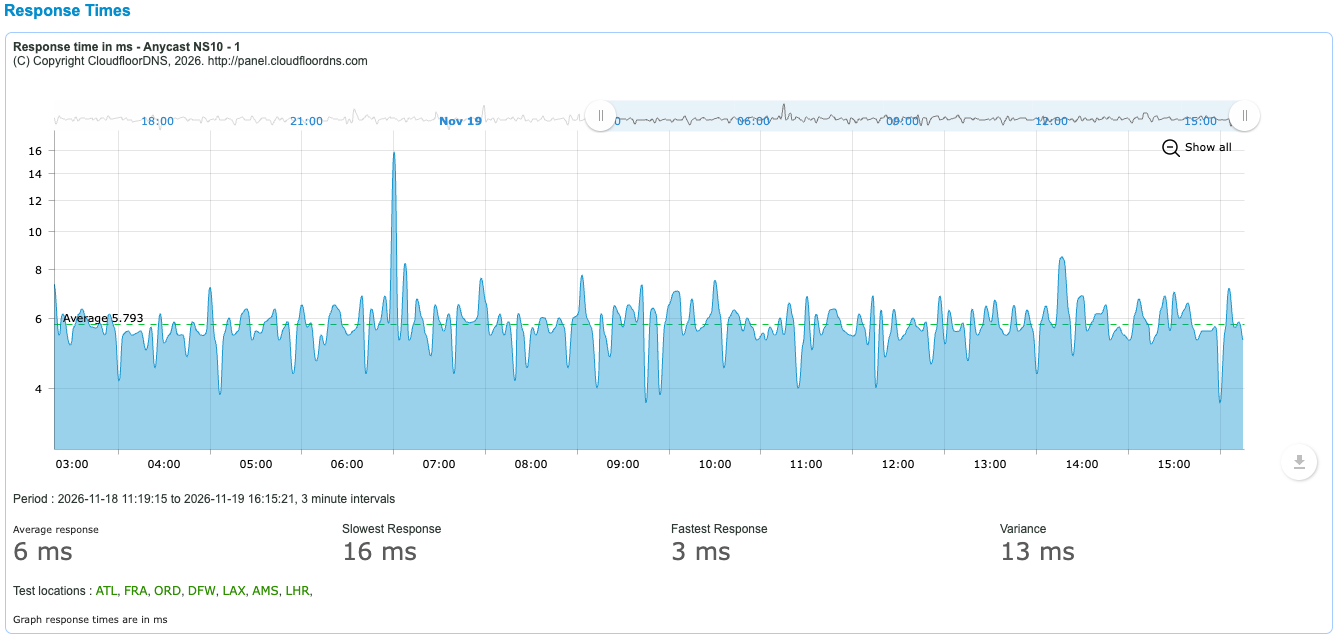
Each test records whether the service answered correctly and how long it took. You get an uptime figure, a response-time graph per test, and a log of every status change.
Why several locations matter
A single monitoring point cannot tell the difference between “your server is down” and “the path between me and your server is having a bad minute”. If you alert on that, you get woken up for problems that are not yours. If you fail over on it, you move traffic for no reason.
Netmon only confirms a fault when a majority of the locations running the test report it. One location on its own never triggers an alert or a failover. If you want to hear about that first lone failure anyway, you can route it to a separate warning profile, and the message is clearly marked as a pre-emptive warning and not a confirmed fault.
The 19 test types
The tests are grouped below by what you are trying to protect. Every test lets you set the port and a response timeout, and every test records its response time.
Websites and certificates
| Test | What it proves |
|---|---|
| HTTP | Your site or API answers over HTTP or HTTPS with the status code you expect. It can also check that the page contains a specific piece of text, or flag when the page content changes. |
| SSL Expiry Monitor | Your certificate is not about to expire. It reads the certificate on any TLS port, reports the name, expiry date and days left, and sends reminders as the date approaches: you choose when they start, from 45 days out down to 1 day. |
| Test | What it proves |
|---|---|
| SMTP | Your mail server accepts connections and greets them properly. A server that is up but refusing mail fails this test. |
| POP | Your POP3 service is answering. Give it a username and password and it also proves that a mailbox can sign in. |
| IMAP | Your IMAP service is answering, with the same optional sign-in check as POP. |
DNS
| Test | What it proves |
|---|---|
| DNS | A specific nameserver answers a specific question. You choose the record type (A, AAAA, MX, NS, TXT, CNAME, PTR, SRV or SOA) and can require a particular answer, so a server that responds with the wrong data fails too. |
| DNS over TCP | The same query, forced over TCP. This catches the firewall that allows UDP port 53 but blocks TCP, which only shows up when a response is too large for UDP. |
| DNS Experience | Your name resolves the way your users experience it: through a recursive resolver, not by asking your nameserver directly. It measures the lookup a real visitor depends on. |
Voice and unified communications
| Test | What it proves |
|---|---|
| SIP UDP OPTIONS | Your SIP server or SBC replies to an OPTIONS request over UDP, and how quickly. This is the standard SIP “are you there” check. |
| SIP TCP OPTIONS | The same check over TCP, for trunks and endpoints that signal over TCP. |
| SIP TLS OPTIONS | The same check over an encrypted TLS connection, so you know secure signalling is working and not only the unencrypted port. |
| Cisco Expressway | Your Expressway edge answers the sign-in discovery request that Cisco Jabber and Webex clients make from outside your network. If this fails, remote users cannot register. |
Remote access and file transfer
| Test | What it proves |
|---|---|
| SSH | The SSH service accepts a connection and identifies itself. You can require a specific string in its banner. |
| FTP | The FTP service accepts a connection and sends its greeting. |
| TELNET | The Telnet service on a network device or legacy system accepts a connection. |
Network and generic ports
| Test | What it proves |
|---|---|
| Ping | The host is reachable, and the average round-trip time across four pings. |
| TCP Connect | A TCP port is open and accepting connections. Use it for any service that does not have its own test. |
| Advanced TCP | A configurable TCP check: any port, your own response timeout, a response-time warning, and a check that the service replies with a value you specify. |
| UDP Connect | A UDP port can be reached. Use it for UDP services that do not have a dedicated test. |
Choosing the right test
The most common monitoring mistake is testing something easier than the thing you care about. A few rules of thumb:
Test the protocol, not the port
An open port 443 does not mean your site works. An HTTP test with a content check does. Use the protocol test whenever one exists.
Ping answers a different question
Ping tells you the machine is on the network. Plenty of servers answer ping while the application on them is down.
Check the answer, not only the reply
A DNS server returning the wrong address is worse than one returning nothing. Set an expected answer where the test allows it.
Layer your tests
Ping plus HTTP plus SSL Expiry on the same site tells you which layer broke, which saves time when the alert arrives.
From alert to action: DNS Failover and Load Balancing
Knowing about a problem is useful. Having it handled while you are still reading the alert is better. Any Netmon test can drive our DNS services:
DNS Failover. When a test is confirmed down, Netmon changes your DNS record to point at a backup. When the primary recovers, it can fail back automatically, or stay put until you decide. With 10-second monitoring, failover can complete in as little as 30 seconds. You can also fail over and back manually from the control panel, which is handy for planned maintenance.
Failover Pools. If one backup is not enough, a pool gives a hostname an ordered list of targets (IP addresses, CNAMEs or ALIAS records), each with its own Netmon test.
DNS Load Balancing. When you spread traffic across several servers, Netmon removes a failed server from the rotation and puts it back when it recovers.
The SIP and Cisco Expressway tests pair with VOIP Failover in the same way.
Notifications
Alerts are controlled by alert profiles. A profile says who gets told, how, and when. Each test can have up to three: a warning profile, an alert profile and an escalation profile.
| Method | How it works |
|---|---|
| One or more recipients. A down alert includes the last response received and a diagnostic trace to the host. A recovery alert tells you how long the service was unreachable. | |
| SMS | Text messages to one or more numbers, with their own start and end times so texts only arrive when you want them. |
| Webhook | Netmon calls a URL you supply with the new status, so you can open a ticket, post to a chat channel or kick off your own automation. |
| Syslog | Test results are sent to your syslog server over UDP or TCP, ready for your SIEM or log platform. |
A webhook is a simple request to your URL with a status of bad, good or warn. If you set a secret token on the profile, it is sent too, so your endpoint can check the call really came from Netmon:
https://hooks.example.com/netmon?status=bad&secret_token=YOUR_TOKENThree settings keep alerts useful instead of noisy:
- Start and end times. Each profile has a window in which it is active, so the overnight profile can go to the on-call phone and the daytime one to the team inbox.
- Alert threshold. The number of times the error condition must occur before an alert is sent. This filters out minor transient faults.
- Escalation and acknowledgement. If a fault continues, Netmon can escalate to a second profile. Every alert email carries an acknowledge link: click it and the escalation stops.
You can also set a response-time warning in milliseconds on a test, to hear about a service that is slowing down before it stops.
Intervals, locations and plans
How often a test runs and how many locations it runs from depend on your plan. Netmon is available on its own, and it is included with DNS Failover.
| Plan | Monthly | Monitors | Interval | Locations | SMS / month | Webhooks and syslog |
|---|---|---|---|---|---|---|
| Free | $0 | 1 | 1 hour | 1 | None | No |
| Starter | $5 | 5 | 5 minutes | 3 | 50 | No |
| Pro | $10 | 10 | 3 minutes | 5 | 100 | Yes |
| Business | $35 | 25 | 1 minute | 7 | 200 | Yes |
| Enterprise | $60 | 50 | 10 seconds | 7 | 400 | Yes |
Email alerts are included on every plan. Larger or custom setups are quoted individually. Full details are on the monitoring plans and pricing page.
Things worth knowing that a sales page usually leaves out
- The standalone Netmon plans are monitoring only. Automatic DNS changes need DNS Failover, which includes Netmon. DNS Failover starts at $50 a month including Anycast DNS.
- A slow response warns you; it does not fail over. Response-time warnings are alerts only. Failover acts on a confirmed failure, not on a slow reply.
- The SSL Expiry Monitor watches the date. It will tell you a certificate is running out. It is not a check that the certificate matches the hostname or chains to a trusted root, so keep an HTTP test on the same site.
- UDP is a quiet protocol. A service that receives a UDP packet is not obliged to reply, so a generic UDP check can only tell you so much. For DNS and SIP, use their own tests, which ask a real question and wait for a real answer.
- Use a dedicated mailbox for sign-in checks. The POP and IMAP login tests work best with a test account created for the purpose, not a real person’s mailbox.
- Majority rule cuts both ways. A problem that only affects one region will reach you as a warning, not as a confirmed outage. That is the right call for failover, but it is worth setting up a warning profile so you still hear about it.
- DNS caching still applies. Failover changes the answer at the source within seconds. Visitors move over as their resolver’s cached copy expires, which is why failover records use a short TTL.
Setting up your first test
Create an account
Sign up at panel.cloudfloordns.com. The free plan is enough to try one test.
Create an alert profile
Decide who is told and how: email addresses, SMS numbers, a webhook URL or a syslog server, with the hours it applies and the alert threshold.
Add a test
Pick the test type, enter the host and port, set what a good response looks like, then choose the interval and the locations to test from. Attach your alert profile.
Decide what happens on failure
Alerting alone is a fine place to start. When you are ready, link the test to DNS Failover or a load-balanced record so a confirmed fault moves traffic on its own.
Find out before your customers do
Start with one free monitor, or talk to us about pairing Netmon with DNS Failover.
Questions about a specific setup? Email support@cloudfloordns.com or sales@cloudfloordns.com, or call +1 781 373 5823.