

CloudFloor DNS Logo
CloudFloorDNS Icon

CNAME Failover – DNS Failover for Disaster Prevention & Remediation

CNAME Failover – DNS Failover for Disaster Prevention & Remediation

CNAME Failover – instant Disaster prevention using Server Monitoring & DNS

CNAME Failover let’s you utilize the benefits of DNS Failover without having to move your DNS to a new managed DNS provider. This let’s you get DNS failover and use it with any DNS provider such as GoDaddy, Verisign, Network Solutions, Ghandi, 1&1 and others. Setup is a breeze and all you need to do is simply change one A-Record in your current DNS and CNAME that to a domain name CloudFloorDNS provides for you. That’s it!

CNAME Failover can be setup quickly and easily and best of all it’s low cost. Once you have your CNAME selected (yournamehere.cfdnsfo.com) you can then setup the monitoring component that tests your server or web application. In most cases it’s a web server, but you can also use CNAME failover with other services and domains if your primary ISP goes down. A good example would be Failing over several hostnames when your primary ISP goes down. We setup a Netmon monitoring agent to test your primary ISP gateway or firewall to determine it’s up. Once we determine the Primary ISP has failed and is no longer responding, we update your CNAME to the backup IP you provide in the Failover. Our low TTL times allow the DNS record to propagate quickly and since your name is CNAMED to ours, you don’t have to change a thing at your current DNS provider

In order to use Failover you must use a monitoring component. Our Patented DNS and Failover platform offers you a way to set up a monitoring test and also provides you with the ability to test the service/server/app every minute from up to seven global locations. False positives (False Alarms) are a thing of the past, we require 3 or more test locations to fail before we kickoff the failover DNS change to the backup. We then notify you that we’ve detected a failure while we are changing the DNS. If you’d like you can enable Fail-Back we can even switch the DNS back to the primary when it comes back up.

Want to learn more about our CNAME Failover service? Watch a video on how CNAME Failover works or reach out and contact one of our DNS Experts for demo and proof of concept.

The importance of securing your website or web app with an SSL Secure Certificate

The importance of enabling SSL Security (HTTPS) on all of your websites

Google is constantly focused on internet security and in recent months have been enforcing more security in their popular Google Chrome browser. The Chrome browser is pushing security (HTTPS) and is now warning users in the browser just to the left of the website as shown in figure 1-1 below. This means all users of Google Chrome browser (the world’s most popular browser) now see this secure or non-secure badge for every website they visit that is not using HTTPS. Starting in July 2018 this warning will be large as shown in figure 1-2 and can’t be missed. This large warning can possibly scare people away from your website if it’s not protected with HTTPS!

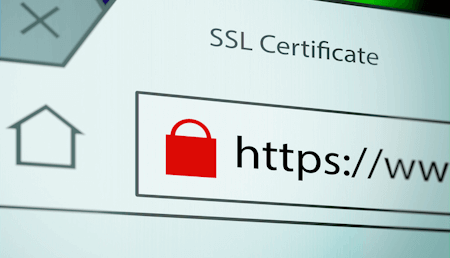
SSL/TLS are encryption mechanisms that help protect the data from your browser to the server across the internet. This keeps any passwords, credit cards and other sensitive data away from prying eyes. In the old days this technology was mainly assigned to any form where credit cards were taken, but now with prying eyes everywhere, google suggests all websites turn on security by installing secure certificates. Once installed, browsers will no longer show the warning and show the green lock and “secure” as shown in figure 1-3
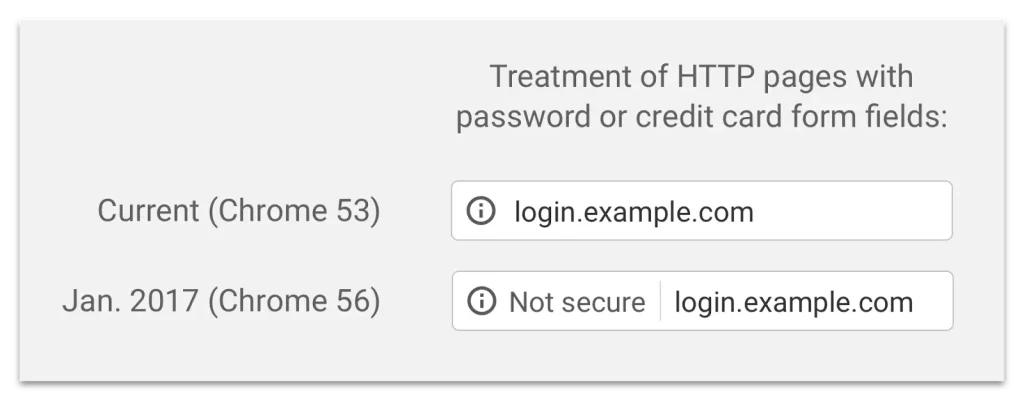
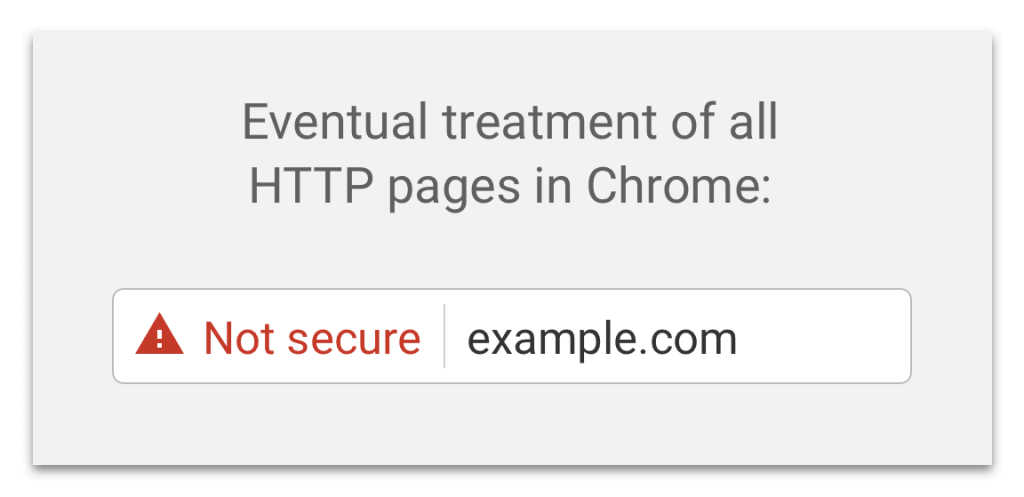
Examples of non-secure website warnings in google chrome
(Figure 1-1) How it looks in the Chrome browser when users visit a Non-Secure website or web-based application
How non-secure pages will look in google chrome
(Figure 1-2) In future versions this is what a user will see during a visit to a Non-Secure website or web-based application

Why would you want to secure your website or web-based application?

There are several factors that would make you want to do this but first and foremost is security for your site and your users and it also helps your visitors to know you care about their security as well. There are other benefits to switching to HTTPS for your website such as increased speed, enhanced SEO or Google page rank and keeping your website or app user friendly. It’s a well know fact that Google has almost 60% of the browser market share which means over half of your users may now be “warned” that your website isn’t secure if you don’t do this. This new browser warning (figure 1-2) can literally scare away new and current users and make them less likely to come back. If you don’t enable HTTPS by installing a secure certificate, you could be pushing your online business slowly out of business!

What is a secure certificate?

A secure certificate or also known as an SSL certificate is a digital file that the web developer or webmaster installs on their web server to enable security. Once installed it creates and verifies the “chain of trust” from the CA or certificate authority, server and browser. It then enables the encryption (HTTPS) so your users can then browse securely, pay for services and other activities on the server and prevents your data and user data from falling into the wrong hands.

a secure website in google chrome
(Figure 1-3) How it will look in the Chrome browser when users visit a SECURE website or web-based application

How do I make my site secure if I run a website or host a web-based app?

Easy, you can purchase and install a secure certificate for your domain on your web server or web-based application server. You can purchase SSL Certificates here or typically at your registrar or web host. There are many different levels of secure certificates, encryption and validation and it’s best to review what’s best for your business and your customers before you purchase a secure certificate. Overall pushing your websites and web-based applications will be a smarter move for your online business and will help protect both your business and your customers well into the future!

DNS SRV Records are the close cousin to MX Records

DNS SRV Resource Records – the close cousin of MX Records

MX Records are one of those critical DNS records that are required for any domain that’s using email. They are a different type of record than all the others in that they have built in redundancy into the record set itself. This built in redundancy comes in from having two or more MX records required (primary and backup server at the least) and priorities set on these records

MX records for email servers would look like:

Host                                          Priority
primarymail.example.com             10
backupmail.example.com              20

MX records are designed this way to ensure mail will be reliable and that there is always a backup server. If an email is sent and the first server isn’t responding, the second server at priority 20 get’s called into duty and the email is delivered. SRV records are another type of DNS resource record that also offers built in redundancy in the form of multiple records with both weight and priority and port. Here’s the excerpt from the RFC written by Paul Vixie back in Feb 2000:

“The SRV RR allows administrators to use several servers for a single domain, to move services from host to host with little fuss, and to designate some hosts as primary servers for a service and others as backups. Clients ask for a specific service/protocol for a specific domain (the word domain is used here in the strict RFC 1034 sense), and get back the names of any available servers.”

SRV records have been around for a while, but since the recent surge of VOIP, UC & UCaaS providers (Unified Communications) and many collaboration clients utilize SRV records for their services. When an organization set’s up a Unified Communications platform such as the Cisco Spark, they setup Cisco Expressways, Cisco Call Managers that offer these services. Clients then request these DNS SRV Resource records when attempting to connect.

For example, when using Cisco UC and firing up the Jabber collaboration client, the client first requests the _collab_edge DNS SRV record set to see available servers.

DNS SRV records for Cisco UC Collaboration (Jabber) records would look like this:

DNS SRV Name   Priority  Weight  Port  Target or (Host)
_collab-edge._tls      1 3 8443 na-jabber.example.com.
_collab-edge._tls      2 2 8443 eu-jabber.example.com.
_collab-edge._tls      3 1 8443 ap-jabber.example.com.

When a user in the North American office of Example corp and fires up their Jabber client the DNS will respond with the above records. This tells the Jabber client to connect to the lowest priority server, in this case we can see that na-jabber.example.com is the lowest priority. If that server isn’t available, the client will step up to the next priority server, in this case the eu-jabber.example.com server.

Just like MX records, you can see that SRV has built in redundancy into the resource record and it goes a few steps further by allowing weight and priority and the service port. Pretty cool huh? Just one of the neat ways you can use DNS SRV….but wait it gets better.

DNS SRV records are great but as companies grow and scale they add more servers and more SRV records. When an employee goes on the road and depending on where they are, the setup of the SRV and VPN or No VPN there are issues with the way the SRV records are handed back. Take the example above, as an employee in the North American Chicago office, It’s no problem since they are always connecting to the na-jabber server. As soon as the employee travels to Japan for a visit, their Jabber client is going to connect all the way back to North America. This can be a problem and not only take longer to connect, but it can also introduce high latency (slowdowns) that can wreak havoc on video quality, connection times and not to mention patience.

Here’s where some DNS SRV and Geographic DNS comes into play. Since we have three global locations to connect to, we can enable GEO DNS on our DNS SRV records and get even more usability out of these handy resource records.

Adding GEO DNS into these _collab-edge records now provide us the advantage to hand back the closest server to them in the region they are in. For example, now when the Chicago employee lands in Japan and connects to Jabber, the local DNS will direct him though the magic of DNS to our CloudfloorDNS Anycast DNS servers which will geo-locate John and determine that he’s using an IP address located in Japan. Our GEO Anycast DNS servers then respond back with the custom order of DNS SRV records for that region which would look like below:

DNS SRV Name   Priority  Weight  Port  Target or (Host)
_collab-edge._tls      1 3 8443 ap-jabber.example.com.
_collab-edge._tls      2 2 8443 eu-jabber.example.com.
_collab-edge._tls      3 1 8443 na-jabber.example.com.

You can see here that Geographic DNS located the user and determined they were in the APAC region and then hands back the DNS SRV records that sets the ap-jabber.example.com server with the lowest priority making it the first choice. We still provide the other SRV records as backup in the order that makes the most sense for lower latency and higher performance. Best of all it works for all DNS SRV record types such as _xmpp-server, _xmpp-client, sip, _sips, _sipfederation, and others. We hope this howto helps you utilize your DNS SRV records to better streamline your services and provide a higher quality of service.

Our new patent on DNS performance & distance based load balancing

CloudfloorDNS awarded US patent on Performance/Distance based Load Balancing

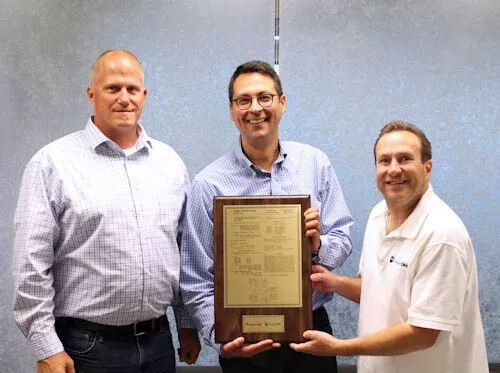
We’re pleased to show off our shiny new US Patent on performance & location based DNS Load Balancing. This is a big deal to us – it’s something that has been in the US Patent system for almost 6 years. This patent is a combination of hard work by a handful of talented people here at CloudfloorDNS and our parent company Everbridge. Why is this patent important? The patent, US# US20130297596 A1 details “systems and methods for performance based load balancing” and covers our unique combination of both performance testing (monitoring servers for latency, uptime) and our GEO DNS and DNS Failover services. This combination of global monitoring and our Anycast DNS network coupled with advanced DNS-based services offer the the best possible performance and reliability for any online business.

US Patent on GEO DNS & Load Balancing
Cloudfloor and Everbridge showing off their new US Patent

How our customers utilize these services:

GEO DNS – Geographically Balancing & Prioritizing Unified Communications

A growing number of clients are utilizing our GEO DNS to hand back DNS SRV records to the fastest/closest server to their end-users and/or employees. SRV records are a type of DNS resource record method to supply a list of records to the unified communications clients (VOIP, CHAT, VOICECHAT, etc) and offer port, hostname, weight and priority with redundancy built in – much like MX (Mail) Records. When an organization has a global presence, they need these servers distributed across the globe to help reduce latency and provide the best possible video/chat/VOIP call quality. Our GEO DNS hands back the DNS SRV Records for the closest regional server allowing for the ultimate in reliability and quality of service for your Unified Communications platforms such as Cisco Unified Communications (CUCM, Cisco Express) and others.

VOIP Monitoring & Failover – Providing the best possible call quality to your users

VOIP services are growing by leaps and bounds and excellent call quality and service reliability is paramount for any VOIP and UCaaS provider. They need to deliver a high availability solution with the lowest possible latency knowing that outages and poor call quality can destroy a business overnight! Our SIP Options (VOIP) monitoring and DNS Failover offer a simple and easy way to provide load balancing, monitoring and uptime to your critical VOIP infrastructure. Our global monitoring check’s your servers using the SIP Options protocol, detects latency or failure and fails over to backups instantly.

These are just a few of the many ways our expertise in performance and distance-based (GEO) DNS and related services are helping organizations provide more reliable & consistent services to their clients. If you think we may be able to help your online business, please contact a Cloudfloor DNS expert

Secondary DNS is the standby generator of your online business

Hurricane Phillipe came into New England with a roar this past sunday, exactly 5 years after superstorm Sandy graced us with her presence in 2013. Just two days later more than 1 million homes are still without power! Many schools and businesses are still closed while the cleanup and power restoration continues and it could be several more days until the regional grid is fully restored.

In some ways the power to your home is just like DNS is to your business. Without it, nothing works. No Lights (Website), No Water (Email), and so on. Things just don’t work and your home doesn’t feel much like home when nothing works.

The relationship to DNS and your online business is similar. DNS is just like the electricity that powers your website, your email, your VPN, VOIP, API’s and other important aspects that make your online business run. Unplanned downtime is extremely expensive since your business can no longer sell online, customers can’t checkout and pay or even see your website for that matter. Their emails to you don’t work and bounce back….in essence it’s a blackout of everything online costing you thousands of dollars in lost sales and opportunity.

Portable and Standby generators are humming along in my neighborhood and many others across the region. These trusty devices are the backup power that many rely on when the power grid fails to deliver. In the online business world, the generator is very much like Secondary DNS. When the power goes out the generator takes over and makes living in the home possible. Secondary DNS does very much the same thing but for your online business. In the event of a DNS outage at your primary provider, Secondary DNS “takes over” and keeps your business running. Best of all, you don’t have to drag the secondary DNS out of the garage and fire it up, it’s 100% automatic and your business will never miss a beat if your primary DNS goes down

Interested in adding more reliability and resiliency to your online presence? We have DNS experts to help you every step of the way and we know how scary it is to mess around with your DNS. Contact us or visit our Secondary DNS product page for more details on how we can help

Don’t let a DDoS attack eclipse your Primary DNS!

Don’t let a DDoS attack Eclipse your DNS

DDoS attacks are on the rise and the experts don’t forsee any slowdown in the near future. Attackers utilize botnets, IoT devices and other compromised systems to build cyber-armies and leverage these armies against you directly or your DNS service provider. In many cases, DD0S attacks can be fatal to small online businesses that aren’t protected.

The first step to protecting your online digital business is at the infrastructure level and that means DNS. Here are a few steps you can use to protect your digital business when it comes to DNS:

1 – Don’t get caught using your “hosting or registrar” DNS 
DNS typically comes free with any domain you register or web hosting or domain registrar but there is a drawback to this. In most cases their DNS is much slower and less resilient when it comes to DD0S attacks. Since DNS is such a critical component to your online success, you should invest in DNS as a business strategy. This means going with Managed DNS and setting up a budget for fast, reliable DNS. Pick a managed DNS provider that uses an Anycast DNS network like CloudfloorDNS, NS1, UltraDNS, Dyn or others. These guys focus solely on DNS as a Service and run large Anycast DNS networks in the cloud. They also have DDoS mitigation in place to help thwart attacks and are typically much more fortified than your Web hosting or domain registrar DNS

2 – Backup your DNS with Secondary DNS
Secondary DNS is a standard method to safely backup your DNS zones onto another DNS provider/network if your primary DNS provider goes down. Secondary DNS has been around for quite some time although it’s not often implemented – even though it can save your business if you have a primary DNS outage (like the attack on Dyn back in Oct 2016). Setting up secondary DNS only takes about 10 minutes if not less and instantly copies your DNS zones to a secondary provider. The “spreads the risk” across two DNS providers and in many cases can also speed up your DNS. Best of all, Secondary DNS is low cost and will have a minor impact on your budget yet provides the best possible insurance you can ask for in DNS Infrastructure

3 – Utilize Advanced DNS services
GEO DNS, DNS Failover and DNS Load Balancing are some of the best ways to manage your DNS Traffic and add uptime to your online services. DNS Failover and DNS Load balancing are standard offerings by all managed DNS providers and are also low cost ways to extend your reliability and scalability. Monitoring your servers from multiple locations and failing over DNS to a backup when your primary fails can help extend the reliability of your customer facing servers and apps. Monitoring them for latency can also be implemented, so any servers that slow down above a certain threshold (in ms) can be taken out of the load balancing pool.

GEO DNS can also be used to increase performance and customer retention. By geo-locating your clients in their DNS requests you can determine the closest/fastest server and then send them to the version of your website or application in their local language and currency. It’s a well know fact that faster websites/apps and localized content helps convert more customers and makes your website or app more “sticky”

These are just a few of the many suggestions to help you keep the lights on when it comes to your digital business and DNS. In the age of DDoS Attacks, ransomware attacks and other digital criminal mischief it’s important that you realize the critical nature of your DNS infrastructure and make proper investments to ensure the reliability of your online operations

Secondary DNS Hosting – Backup your DNS with ease!

Secondary DNS Hosting – DNS Backup Service

DNS is such a critical component to your digital business and it’s surprising how many folks don’t realize it. DNS is often taken for granted and becomes an afterthought until it goes belly up and stops working. When DNS stops, EVERYTHING stops!

Secondary DNS to the rescue! Secondary DNS is a standard method to safely backup your DNS zones onto another DNS provider/network if your primary DNS provider goes down. Secondary DNS has been around for quite some time although it’s not often implemented – even though it can save your digital bacon if you have a primary DNS outage (like the attack on Dyn back in Oct 2016)

Since the Dyn DDoS attack, we’ve seen a huge influx of questions and activity around our Secondary DNS service. In order to take the mystery out of Secondary DNS, we created several techncial how-to’s on implement a Secondary DNS solution using CloudfloorDNS as your DNS backup. If you currently have a single DNS provider and are using Dyn, NS1, DNS Made Easy or GoDaddy Premium DNS we have a Secondary DNS how-to that shows you step by step on how to enable Secondary DNS hosting at CloudfloorDNS. It literally takes less than 10 minutes to setup and can save you thousands of dollars in the event of a primary DNS outage.

Interested in learning how to setup Secondary DNS for your online operation? See our Secondary DNS tutorials on our Secondary DNS hosting page or scroll below to download them directly

Hosting DNS at DYN? – Backup your DNS at CloudfloorDNS [PDF]

Hosting DNS at DNSMadeEasy? – Backup your DNS at CloudfloorDNS [PDF]

Hosting DNS at NS1? – Backup your DNS at CloudfloorDNS [PDF]

Hosting DNS at GoDaddy? – Backup your DNS at CloudfloorDNS [PDF]

Walking the internet infrastructure Tightrope

DNS has been a hot topic recently when two large companies operating online went down due to DNS outages. No matter how big or small an online organization is, they all rely on DNS to operate online since it’s a core part of internet infrastructure. With recent attacks and outages, many are starting to realize that it’s important to have a reliable DNS network or two powering your internet infrastructure – aka DNS. DNS is the one core technology that’s involved in everything your business does online, yet it’s almost always overlooked. Odd, isn’t it? It’s really the most important thing next to keeping your domain names registered and the sad truth is many businesses don’t realize this until it’s too late….

Just ask Fonality and National Australian Bank just how important DNS is. Both companies had some major DNS outages in the last few weeks that took down a bulk of their customers access to their systems. Fonality customers couldn’t make calls via their VOIP services for several hours and Australian National Bank customers couldn’t use ATM’s, Mobile Internet banking, payment processing and call centers for almost 24 hours.

Outages like these not only damage the brand of the organization, but they can be very costly financially. Some of these financial losses will be from customer abandonment and opportunity lost with new customers, but the real cost is within the operation itself. Support call centers get inundated, (if customers can even reach them) and ops and marketing folks are running around trying to fix these issues and put out fires instead of working on other more important things. Depending on what domains are involved, a DNS failure can take everything offline and cripple all online operations – Not good.

To be fair, one of these DNS issues did come about from human error, but it goes to show you just how important DNS truly is to your online success. Investing in your internet operations is a good idea to prevent issues like these and outsourcing to a managed DNS provider (or two with Secondary DNS) is one of the best investments you can make for your business. Think of it as added job security and adding a little insurance to your online operations. Spending a little now can prevent spending a whole lot more down the road if and when you do have a DNS issue.

Fine tune your Internet Content Delivery with DNS

Fine tune your Content Delivery with DNS

Today’s Internet economy is truly global and your organization can expect visitors and customers from the far corners of each continent. Servicing customers is just one aspect of your online operations, and you’ll also be connecting offices and remote employees with the tools such as Skype, GotoMeeting, VOIP, VPN and other essentials they’ll need to perform their jobs.

All of these websites, VPN’s, Telephony, SaaS and Cloud based services all rely on DNS to operate and every day more companies realize the true importance of robust DNS…it really is the foundation of the Internet. Once you have a solid DNS infrastructure that you can rely on, it’s time to start utilizing the DNS to fine tune the speed and delivery of your content and online services.

DNS Load Balancing and GEO DNS are just a couple of methods integrated into the CloudfloorDNS platform that help you adjust the granularity and location delivery of your content and services. DNS Load Balancing provides the ability to direct visitors to multiple IP’s or servers in a distributed fashion based on a few well known methods of balancing. You can distribute the DNS requests evenly across multiple servers, truly balancing the load so each server gets an even amount, or you can adjust the percentage to send more hits to your server with the most “beef”.

Add DNS Failover and integrated server monitoring and you now can monitor response time and availability of each host and set rules to pull the host in and out of service if becomes degraded or offline. The variations are endless with over 14 testing methods and protocols and failover options.

Adding GEO DNS to the mix adds yet another level of optimization. Using the Cloudfloor GEO DNS gives your DNS the ability to define custom DNS replies based on the origin of the user’s request. Have different content for the EU and North America? Easy, simply point North America to one IP, and EU countries to the Second IP.

GEO DNS
Our GEO DNS does this by utilizing EDNS0 or client-IP technology and gives our Anycast DNS network the ability to determine the exact GPS location of the user and directing them to content tailored for that country or region. Managing your traffic at the DNS level can give you the speed, flexibility and scalability you need to grow your online operations and provide your visitors with the faster more precise content, product and service offerings.

Want more detail on our GEO DNS and DNS Load Balancing? See the individual product pages, datasheets or contact us for more information

CloudfloorDNS and Everbridge IT Alerting Integration

Exciting new integration with Everbridge IT Alerting Platform

Today we announced an exciting integration pairing our Netmon Server and Network monitoring solution with the Everbridge’s Unified Critical Communications platform. What does this mean to you and why should you care?

Cloud Computing is big business and downtime can not only cost you lost revenue, but lost customers and irreversible damage to your brand. That’s why KNOWING about a failure or outage is just as important as FIXING it…The integration between these two platforms helps reduce the MTTK (Mean Time to Know) and can save an organization thousands of dollars by helping to resolve the issue faster.

CloudfloorDNS Netmon Server and Network monitoring service utilizes over 15 different methods for determining a server failure or degraded application performance. When any degradation or outage is detected, the Netmon service notifies the appropriate IT or operations team via the Everbridge IT Alerting Critical Communications platform. While the appropriate teams are being notified about the outage via the Everbridge IT Alerting platform, the Netmon service can also trigger DNS Failover to redirect the resource or application to a backup server(s) until the issue is fixed. Utilizing other publishing methods within the Everbridge ITA platform, customers can also automatically update social media and other channels to keep both employees and customers in the loop.

Interested in learning more about CloudfloorDNS Netmon Server and Network Monitoring? Interested in the Everbridge IT Alerting platform?

CloudfloorDNS, An Everbridge Solution – https://www.CloudfloorDNS.com